The operating system for the one-person shop
You run the shop.
ShopLog runs the business.
You're the maker, the estimator, the scheduler, the buyer, and the bookkeeper — usually before lunch. ShopLog puts all of it in one place, so you always know what's due, what to charge, and whether the job made money.
Nothing to install · Works on every device · Cancel anytime
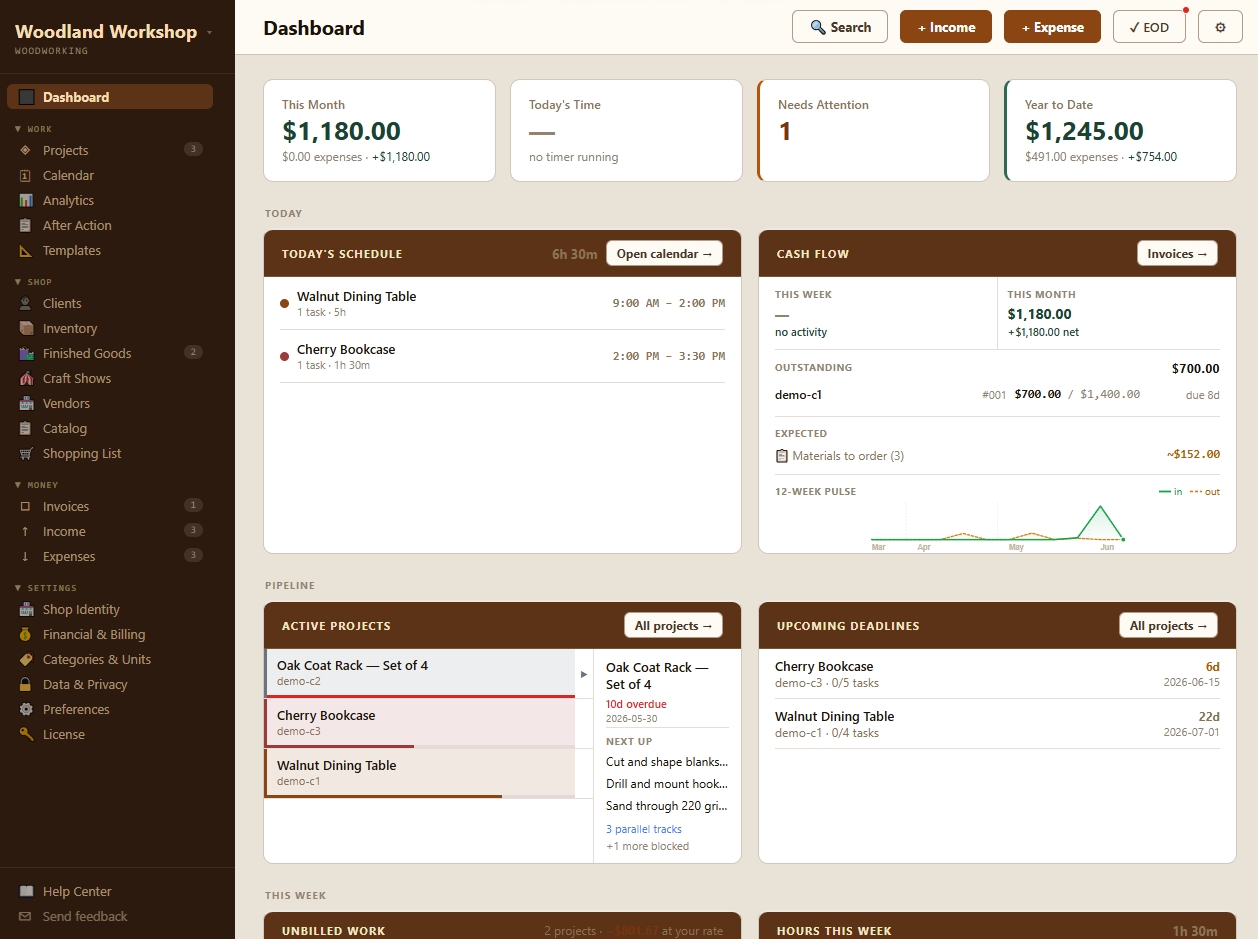
First thing Monday, one screen: what's active, what's due, what you haven't billed, and where today's hours are going. Nothing hiding in a spreadsheet.
Built by a working maker — Jason runs his own one-person shop on ShopLog every day.
// sound familiar
Running the shop is the easy part.
It's everything around the work — and most of it lives in your head, your phone, and a stack of receipts.
The customer's details are split across three text threads, an email, and a note on the bench.
You quoted the job weeks ago and have no honest idea whether you made money on it.
You're at the supplier and can't remember what this project still needs.
Every deadline lives in your head — and this week they've started to overlap.
You were slammed all week, and can't say which of it was actually profitable.
The invoice is late again, because you're still piecing together what the job cost.
You're built for the shop. ShopLog is built for everything else.
// one connected system
Nine jobs. One loop. No re-typing.
Most shops keep these in nine places — texts, a notebook, a spreadsheet, a shoebox. ShopLog keeps them in one loop, where each step feeds the next.
-
Customer who it's for
One record per client and vendor — contact info, full history, and what each is worth to you.
-
Estimate the quote
Send a quote that stays off your books until they say yes — then it becomes the project.
-
Project the job
Every job's tasks, materials, hours, income, and expenses in one place.
-
Tasks the steps
Break the build into steps, with dependencies so first things come first.
-
Schedule the week
Drag tasks onto the week; dependencies stop you scheduling drywall before framing.
-
Time & materials the real cost
One tap starts a timer that follows you. Track materials, get a shopping list by store.
-
Invoice getting paid
One click turns the job into a branded invoice with a pay-online link. It marks itself paid.
-
Profit the truth
Real profit per job and your true hourly rate — because it all landed on the project.
-
Lessons next time
Close a job, see estimate vs. reality, and get a sharper number for the next quote.
Change one thing and the rest keeps up. Log an hour, profit updates. Accept an estimate, the project's already there. That's the difference between nine tools taped together and one shop that runs itself.
// what changes
Not more software. A shop that runs like a business.
Know what needs attention today
Open ShopLog and the day's already sorted — what's due, what's unbilled, what's on the bench.
Make delivery promises you can keep
See the real week before you commit, so "ready Friday" is a plan, not a hope.
Keep the machines running
Balance machine time and your own hands without losing the human schedule.
Know whether a job made money
Real profit per job — because being slammed and being profitable aren't the same thing.
Turn finished work into sharper quotes
Every finished job makes your next estimate more accurate — pricing stops being a guess.
Keep every record connected
Customer, project, purchase, and payment in one trail — no reconciling four places at tax time.
Close the day and put it down
Log the last payment and go home without carrying the whole shop in your head.
// inside ShopLog
Everything the business side needs. Nothing it doesn't.
Built one feature at a time for a working shop — not a generic app with a woodworking photo bolted on.
Signal-first dashboard
Active projects, cash flow, this week's hours, and unbilled work — on one screen.
Estimates
Quote before you commit. Accepted estimates roll straight into a project.
Projects & dependencies
Tasks, materials, hours, income, and expenses per job — with dependencies that keep the order honest.
Weekly calendar
Drag tasks onto the week and see what's really on for today.
Live time tracking
One click starts a timer that follows you. Forgot? Log time by hand.
Materials, inventory & shopping
Track materials per job, keep stock with reorder levels, and get a shopping list by store.
Invoices that get paid
Branded invoices, emailed in a click, with a pay-online link that marks them paid.
Profitability analytics
Monthly P&L, project ROI, real hourly rate, and Pricing What-If — know what to charge next time.
After Action Report
Close a project and see estimate vs. reality — rate, margin, where it all went. Export as PDF.
// why this exists
"I was running a one-person woodshop and keeping books in QuickBooks. I lasted about two months
before I gave up and went back to a spreadsheet — then gave up on that too. I couldn't answer
one simple question:
Am I actually making money?"
So I built the tool I needed — open it Monday morning, log a payment in ten seconds, and close. No accounting degree, no ten-tab spreadsheet, no guessing. I've run my own shop on it every day since. Today it's online, synced to every device in the shop.
— Jason Peltier, maker & developer
// pricing
One shop. One subscription. Everything included.
No tiers, no add-ons, no per-feature upsell — the whole system, on every device.
ShopLog · Monthly
Everything ShopLog does, on every device. Billed monthly — cancel anytime.
- The whole connected system — estimates to profit
- Works on every device you sign in on
- Email invoices with a pay-online link
- Automatic cloud backup — nothing to lose
- Always the latest version, nothing to install
- Your data is yours — export anytime
Cancel anytime · No long-term commitment · try the free demo first →
Founding-50: the first 50 shops lock in $14.50/month for life — half off, forever. Enter your Founding-50 code at checkout.
Already bought ShopLog v1? Early v1 customers get lifetime access to the new ShopLog. Reach out and we'll get you set up.
// common questions
Good questions.
Who is ShopLog actually for?
One-person and very small maker shops — woodworkers, metalworkers, leatherworkers, sign makers, 3D-print and custom-production shops. If you run the whole business yourself and the paperwork is winning, this is built for you.
Does it work for my craft?
Yes. ShopLog asks what kind of shop you run during setup and pre-loads sensible categories and units. The connected loop — estimate, project, schedule, materials, invoice, profit — is the same whether you turn bowls, weld gates, or cut signs.
Where does my data live, and is it safe?
In your private, secured cloud workspace, encrypted in transit and tied to your account — that's what puts the same shop on your desktop, tablet, and phone in real time. It's backed up automatically, so a dead laptop is a non-event, and it's yours to export anytime.
Does it work on my phone and my shop computer?
Yes. ShopLog runs in any modern browser — desktop, tablet, or phone — with nothing to install. Sign in on the shop PC to plan the week, then check what a project needs from your phone at the supplier. It's the same live shop everywhere.
How long until I'm actually using it?
Minutes to set up, and you can grow into it. Start by logging real jobs and payments; add estimates, scheduling, and inventory as you go. You don't need to configure the whole system before it starts earning its keep.
Does this replace my accounting software?
ShopLog runs the operations side — estimates, projects, scheduling, materials, invoicing, and profit per job. It's the shop's day-to-day system, and it hands you clean, connected numbers to give your accountant at tax time. It's the tool QuickBooks never was for a maker.
What if I want to cancel?
Cancel anytime from your billing settings — no long-term commitment. Export your data on the way out; your books, projects, and customers belong to you, not to us.
Can I see it before I sign up?
Yes — app.getshoplog.com runs a full sample shop right in your browser, pre-loaded with realistic data, so you can click around before you create an account.
I'm an existing ShopLog v1 customer — what happens to me?
You're looked after. Early ShopLog v1 customers get lifetime access to the new ShopLog. Send a note and we'll get you moved over.
What if I need help?
ShopLog is built and run by a working maker, not a call center. Questions go straight to jason@jasonpeltier.com — maker to maker.
Your shop, finally running like a business.
Estimates, projects, scheduling, materials, invoices, and profit — in one place, built for the way a one-person shop actually works.
Nothing to install · Cancel anytime · Your data is always yours